What this blog covers and expects you to know.
Expectations
- Know what ethernet frame is like.
- Know how to use wireshark.
- endianness
Covers
- Usage of libc on rust
What is it and why do we need it?
Address Resolution Protocol is used to create a mapping between layer 2(Hardware Address) i.e. Mac Address and layer 3 Address(IP Address). Even though it is specifically used for IP. It is designed to be completely decoupled to the layer 3 protocol.
Switch is a layer 2 device and only understands hardware addresses and network applications work layer 3 onwards where you interact with IP/TCP and so on.
Imagine a Scenario
You have a Raspberry Pi server in your home to store your files, how does your router(which has an integrated switch) know how we need to send/receive packets from that particular machine when you type 192.168.29.3 on your browser.
Role of a switch and mac addresses
Mac Address: It’s a 6-byte hardware address on a device network interface card. First 3 bytes are vendor related and other 3 bytes are specific to device.
So your laptop’s mac might look like Intel_c3:a9:7e Vendor Bytes + UID
Switch is a device that works on routing packets based on mac addresses. A switch has ports where you connect your device to or Wireless. But the broadcast domain remains the same.
              +--------+
              | Switch |
              +---+----+
         _________|__________
        |         |          |
        v         v          v
  +----------+ +------------+ +--------+
  | Pi Server| | My PC      | | Other  |
  |          | | (btw Arch) | |  PC    |
  +----------+ +------------+ +--------+
A switch’s job is to forward traffic between your local network based on the mac address and the port where it is connected to, it has zero knowledge about IP.
How actual forwarding works
- Ethernet packets contain the src and dest mac address(Somehow - We will tell about this in a bit)
- The switch forwards the packet to the particular port.
How ARP comes into picture and how we create the mappings of IP and mac.
- For my Raspberry Pi to send cat images to my mobiles. It needs to know the local IP of my mobile and the mac address of my mobile.
- For it to create a mapping it needs two steps. 1. A broadcast that says(Who has 192.168.29.3) 2. To reply(Intel_c3:a9:7e is at 192.168.29.3)
Two steps of mapping IP to MAC address
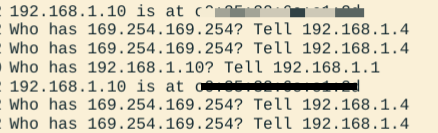 Step 1: Who(what hardware address) owns this protocol addresses(IP)
Step 2: I(hardware address) own this protocol address(IP).
Step 1: Who(what hardware address) owns this protocol addresses(IP)
Step 2: I(hardware address) own this protocol address(IP).
Do these steps happen always?
- Try it out on wireshark please?
Answer
- They do not. And the reason being every computer has a cache. Called the ARP table. It stores the responses of a ARP response on your machine.
- You can clear your ARP table and ping a machine in your local address or just call your default gateway to see how it works on wireshark.
Coding our own host
Responsibilities of a host
- When you do not have a hardware address broadcast the need of knowing a hardware address.
- When you get a broadcast request. Reply to it.
- When you get a response to a broadcast, store it in your ARP table.
- Somehow help the switch to know your presence so that it can update its internal mac table.
host.rs and boot.rs
host.rs
Steps
- Opens a socket:
AF_PACKET+SOCK_RAWso the kernel hands us every raw ethernet frame (filtered toETH_P_ALL). - Loop:
recvraw frames into a 2048-byte buffer. - Skip frames shorter than the 14-byte ethernet header, then keep only ARP frames (EtherType
0x0806at bytes 12..14). - Parse what we need: src MAC (bytes 6..12), sender IP (bytes 28..31), target IP (bytes 38..41).
- Passive learning - every ARP frame tells us
sender_ip -> src_mac, no matter who it is addressed to. We install that mapping into the kernel’s ARP table via theSIOCSARPioctl. Even an ARP request meant for someone else leaves us smarter. - Reply - if the frame is a broadcast (
ff:ff:ff:ff:ff:ff) asking for our IP, build an ARP reply (opcode 2) andsendtoit through asockaddr_llso the kernel knows which interface and target MAC to use.
boot.rs
Reason
To populate the mac table in the switch. On boot the host just sends an marker broadcast that it is present at a particular IP. This helps the switch and other host in the network to build a mac table or update the ARP tables.
Steps
- Read our own IP and MAC from the interface.
- Open a raw socket filtered to
ETH_P_ARP. - Build a gratuitous ARP frame: an unsolicited announcement of “my MAC is at my IP”, addressed to the broadcast MAC
ff:ff:ff:ff:ff:ff(opcode 1, target = ourselves). sendtoit once and close the socket.
 source: host.rs
That single frame does a lot of work: the switch learns src MAC -> inbound port, and every other host’s ARP cache learns our IP - so nobody ever has to request us. It is the “hello, I am here” of layer 2.
First experience with endianness
- While putting the protocol in the filter for the socket(so the kernel hands me only ETH ARP traffic) I passed the value in directly and nothing ever logged. After spending some time, I figured it out. Network byte order is big-endian, but the CPUs I code on are little-endian. The socket compares your filter value against the on-wire ethertype, so the constant has to be converted with
.to_be()before it goes to the kernel. The same gotcha bites whenever you hand a multi-byte value to the network.
Coding our own switch
Responsibilities of a switch
- Know what mac addresses are connected to what interfaces.
- Create a map of the interface ID and the mac address.
- Be able to forward packages to particular ports by reading ethernet headers
- Learn mac address and interface name passively.
Switch.rs
Reason
A switch is a layer-2 device: it forwards frames purely by MAC address, has no IP and sends no ARP of its own. It is a passive learner - it reads every frame crossing its ports and records src MAC -> inbound port. Real switches keep this map in CAM; ours is just a HashMap.
Steps
- Open one raw socket (
AF_PACKET,ETH_P_ALL) per port (eth0,eth1,eth2) and put each interface into promiscuous mode (SIOCGIFFLAGS/SIOCSIFFLAGS+IFF_PROMISC) so we see every frame on the wire, not just those addressed to our own MAC. - Loop over the ports,
recvwithMSG_DONTWAITso one chatty port does not block the others. - Keep only ARP (
0x0806) and IPv4 (0x0800) frames. Drop multicast but keep broadcast - the docker host’s multicast traffic would otherwise storm the loop. - Learn - record
src MAC (bytes 6..12) -> inbound portinmac_table. - Forward by destination MAC:
- broadcast (
ff:ff:ff:ff:ff:ff) -> flood every port except the inbound one - unicast with a known dest -> forward out the port that dest was learned on
- unicast with an unknown dest -> flood the rest (like broadcast), which is also how the switch learns the return path.
- broadcast (
Docker Networking Setup
Topology
            ┌── net-alice-switch ── alice (10.0.1.10)
 switch ────┼── net-switch-bob ──── bob   (10.0.2.10)
            └── net-switch-carol ── carol (10.0.3.10)
Each docker network has exactly two members, so it behaves as a point-to-point link rather than a shared segment. alice, bob and carol are never on the same network - the only path between any two of them is through the switch container. That forces the switch to have three ports, which is exactly why it needs a real MAC table instead of relaying “whatever comes in one port goes out the other”.
Hosts
- alice, bob and carol are Debian containers with
iproute2,tcpdumpandping/arping. Each runs thehostbinary (bind-mounted fromarp/target/debug/host) against itseth0. - Kernel ARP is disabled on every interface (
ip link set eth0 arp off) so the kernel can’t answer requests or fill its neighbor cache behind our backs - our implementation owns ARP on the link, exclusively. - The docker-assigned IPs (10.0.1.10 / 10.0.2.10 / 10.0.3.10) are the addresses the raw sockets actually operate on. The interface mask is widened to
/16so all three nodes treat each other as directly attached despite sitting on different docker networks. - Interfaces get fixed, recognizable MACs (alice
02:a1:1c:e0:00:0a, bob02:b0:b0:00:00:0b, carol02:ca:20:10:00:0c) so frames in tcpdump are easy to tell apart.
Switch
- The switch container has three interfaces -
eth0,eth1,eth2, one per link, each with its own fixed MAC (02:00:00:00:00:e0/e1/e2) - and runs theswitchbinary. - Kernel ARP is off on the switch ports too.
- Containers get
NET_ADMINandNET_RAW: the raw sockets and the ioctls (SIOCSARP, promisc-mode) need them.
Try it
./docker/up.sh                                # build binaries + bring topology up
docker compose -f docker/docker-compose.yml logs -f switch   # watch the switch learn MACs
docker exec alice tcpdump -ni eth0 arp        # a host's view of the wire
docker exec alice ping -c1 10.0.2.10          # alice resolves bob via OUR ARP
With kernel ARP off, nothing works until your host code resolves neighbours and your switch code forwards frames. Ping failing until you get it right is a pretty good unit test.